

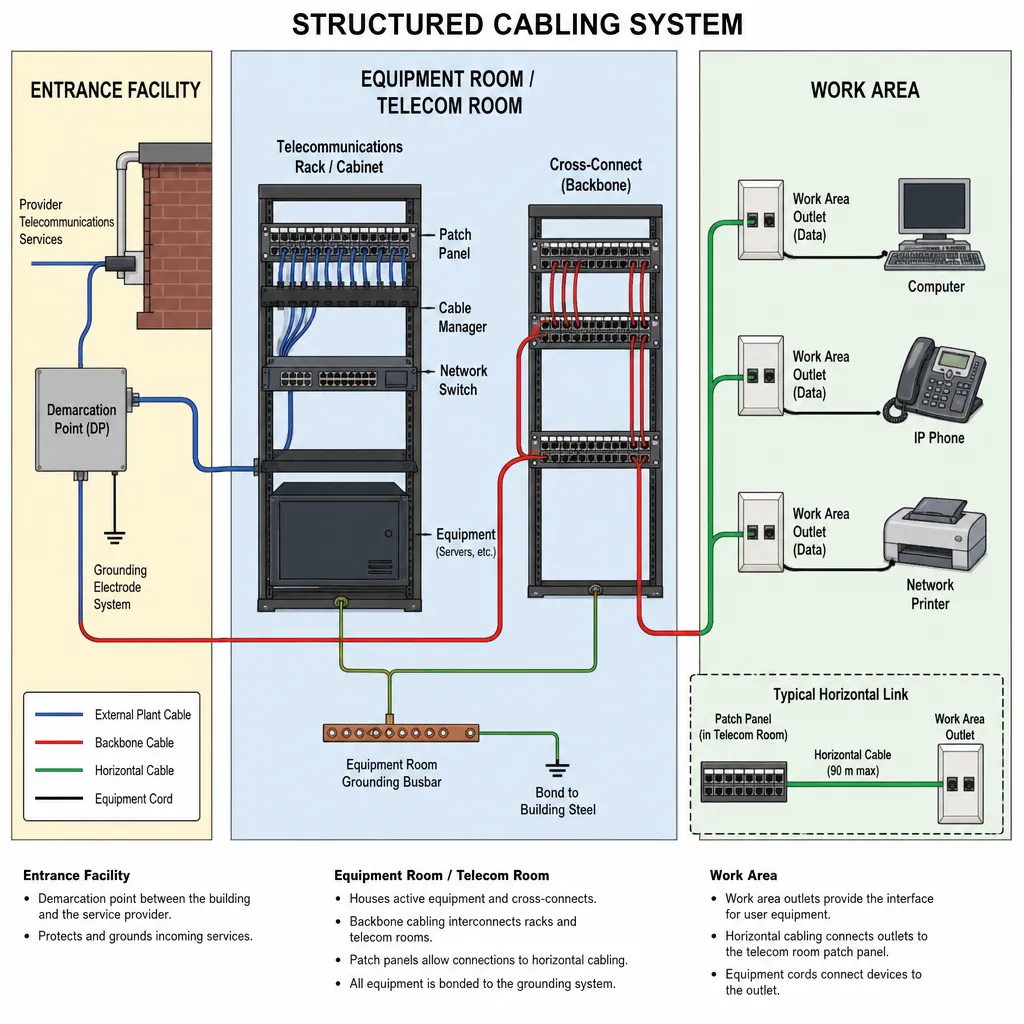
What Is Structured Cabling and Why Does It Matter?
A reliable network starts with the physical infrastructure behind the walls, above the ceiling, and inside the telecom room. Structured cabling is the organized system of cables, connectors, racks, patch panels, pathways, and hardware that allows data, voice, video, security, Wi-Fi, and building systems to communicate. Instead of running one-off cables whenever a new device is added, structured cabling creates a planned foundation for the entire network.
It gives businesses a cleaner, more scalable, and easier-to-manage way to connect computers, servers, phones, access points, cameras, printers, point-of-sale systems, and other technology. For businesses that rely on fast internet, cloud applications, video conferencing, connected security, and hybrid work tools, structured cabling matters because it directly affects network performance, reliability, safety, and long-term cost.
A Simple Definition of what is Structured Cabling
Structured cabling is a standardized approach to designing and installing network cabling inside a building or campus. It uses a planned layout, consistent cable types, labeled connection points, and centralized equipment areas to support current and future technology needs.
In practical terms, structured cabling is the highway system for your business technology. Data travels through this infrastructure from one point to another, whether that means connecting a workstation to the internet, linking a wireless access point to a network switch, or transmitting video from a security camera to a recorder.
A structured cabling system usually includes:
- Ethernet copper cabling, such as Cat5e, Cat6, Cat6A, or higher
- Fiber optic cabling for high-speed or long-distance connections
- Patch panels and network racks
- Wall jacks, faceplates, and work area outlets
- Cable trays, conduits, and pathways
- Telecommunications rooms or equipment closets
- Backbone cabling between floors, rooms, or buildings
- Testing, labeling, and documentation
The key idea is structure. Every cable has a purpose, a route, a label, and a termination point. This makes the network easier to expand, troubleshoot, and maintain.
How Structured Cabling Differs From Basic Cabling
Basic cabling often happens reactively. A company needs a new desk, camera, or access point, so someone runs a cable from one device to another. Over time, this can create tangled wiring, unclear connections, inconsistent cable quality, and difficult troubleshooting.
Structured cabling is different because it is designed as a complete system. It accounts for the building layout, equipment locations, device density, bandwidth needs, future growth, and industry best practices. A basic cable run solves one immediate problem. A structured cabling system supports the entire network environment.
For example, if a small office adds new employees, a structured system makes it easier to activate existing ports or add new drops in a predictable way. If a warehouse expands its Wi-Fi coverage, organized cabling helps access points connect back to the network closet without messy point-to-point wiring. If a medical practice upgrades to cloud-based software, a strong cabling foundation helps reduce slowdowns and connectivity issues.
Why Structured Cabling Matters
Modern businesses depend on connectivity for nearly every daily task. When the network slows down or fails, productivity can drop quickly. Employees may lose access to cloud files, payment systems, phones, scheduling platforms, security cameras, or customer communication tools. Structured cabling matters because it helps prevent the physical network from becoming the weak link.
A well-designed system can improve:
- Network speed and consistency
- Uptime and reliability
- Troubleshooting time
- Cable organization and safety
- Scalability for future technology
- Support for Wi-Fi, VoIP, video, and cloud tools
- Long-term return on infrastructure investment
In many businesses, the cabling infrastructure lasts longer than the devices connected to it. Computers, phones, switches, and access points may be replaced every few years, but quality network cabling can support multiple technology refresh cycles when installed correctly.
The Main Components of Structured Cabling Systems
Structured cabling systems are made up of several interconnected parts. Each part plays a role in moving data efficiently throughout a building or campus.
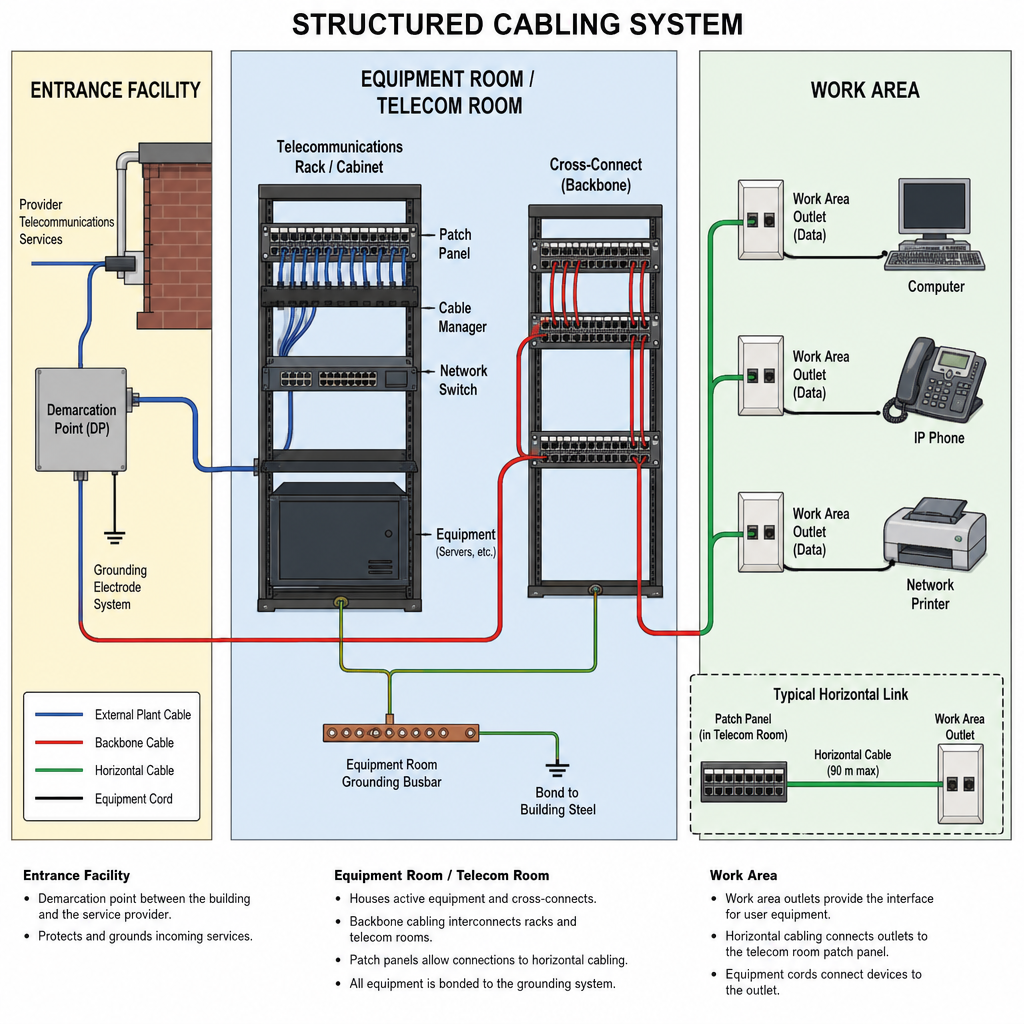
Entrance Facilities
The entrance facility is where outside service provider connections enter the building. This may include internet, phone, or fiber connections from a telecommunications carrier or internet service provider. From this point, service is connected to the internal network infrastructure. This area often serves as the bridge between the provider’s network and the business’s private network.
Equipment Rooms
An equipment room houses core network hardware, such as servers, switches, routers, firewalls, storage devices, and telecommunications equipment. In larger facilities, this room may serve as the central hub for the entire building or campus. Good equipment room design considers cooling, power, security, cable management, access control, and room for future expansion.
Telecommunications Rooms
Telecommunications rooms, sometimes called telecom closets or IDFs, are intermediate connection points throughout a building. They often contain network switches, patch panels, racks, and cable management hardware. In a multi-floor building, each floor may have its own telecom room. Horizontal cabling from desks, access points, cameras, or other devices typically runs back to the nearest telecom room.
Backbone Cabling
Backbone cabling connects major network spaces, such as the entrance facility, equipment room, and telecommunications rooms. It may run between floors, across a building, or between buildings on a campus. Fiber optic cabling is often used for backbone connections because it can support high bandwidth over longer distances. Copper cabling may also be used in certain applications, depending on distance, speed, and equipment requirements.
Horizontal Cabling
Horizontal cabling runs from a telecommunications room to work areas, outlets, wireless access points, cameras, or other network endpoints. In offices, this is often the cabling that connects wall jacks to a network closet. Although the term horizontal is commonly used, these cables may travel through ceilings, walls, conduits, or floor pathways. The important point is that they connect users and devices back to the network distribution area.
Work Area Components
Work area components include the visible connection points used by employees and devices. These may include wall plates, jacks, patch cords, and connectors at desks, conference rooms, reception areas, exam rooms, classrooms, or retail counters. A clean work area setup helps employees connect devices easily while reducing exposed cables and clutter.
Patch Panels and Cable Management
Patch panels are connection points that allow cables to be organized and managed inside a rack or cabinet. Instead of plugging long cable runs directly into network switches, cables terminate at patch panels and are connected to switches with shorter patch cords. This makes it easier to move, add, or change connections without disturbing the entire cabling system. Cable managers, trays, Velcro ties, and labeling systems help keep everything organized.
Common Types of Network Cabling
Different network environments require different cable types. The right choice depends on speed requirements, distance, budget, interference concerns, and future growth.
Copper Ethernet Cabling
Copper Ethernet cabling is common in offices, schools, retail spaces, medical practices, and many commercial buildings. It is often used for workstations, printers, phones, access points, cameras, and other endpoint devices. Common copper cable categories include:
- Cat5e: Often used for basic gigabit connections in existing installations.
- Cat6: A common choice for modern commercial networks and general office connectivity.
- Cat6A: Often selected when higher performance, greater bandwidth, or better support for demanding applications is needed.
Copper cabling is widely used because it is cost-effective, familiar, and compatible with many network devices. However, it has distance limitations and may be affected by electromagnetic interference in certain environments.
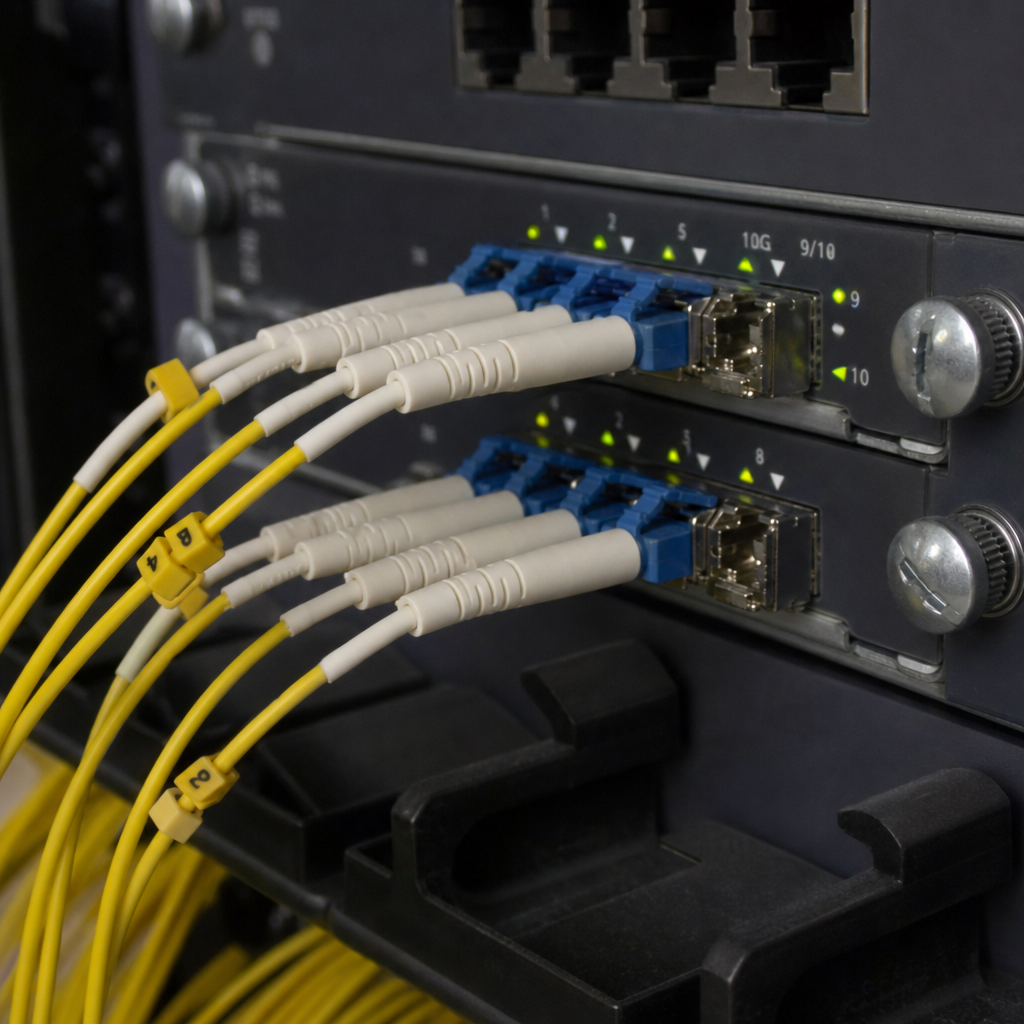
Fiber Optic Cabling
Fiber optic cabling uses strands of glass or plastic to transmit data as light signals. It is commonly used for high-speed backbone connections, long-distance links, data centers, campus networks, and environments that require significant bandwidth. Fiber optic cabling can support longer distances than copper and is less vulnerable to electromagnetic interference.
There are two broad categories of fiber:
- Single-mode fiber: Often used for longer distances and high-capacity links.
- Multimode fiber: Often used for shorter-distance high-speed connections within buildings or campuses.
For a detailed comparison, see our guide on single mode vs multimode fiber. The best choice depends on the application, distance, transceivers, and long-term network plans.
Coaxial and Specialty Cabling
Some facilities may still use coaxial cabling for video, broadband, or legacy systems. Others may require specialty cabling for building automation, audio-visual systems, access control, industrial controls, or low-voltage devices. A structured cabling plan may include multiple cable types, but the goal remains the same: create a consistent, documented infrastructure that supports the business.
Key Structured Cabling Benefits
Structured cabling benefits go beyond neat cable runs. A well-planned system can improve the way a business operates, grows, and manages technology.
Better Network Performance
A network is only as strong as its weakest link. Even if a company pays for high-speed internet or invests in modern switches and access points, poor cabling can cause bottlenecks, packet loss, intermittent connections, or inconsistent speeds. Structured cabling helps support stronger performance by using appropriate cable types, organized pathways, proper terminations, and tested connections.
Easier Troubleshooting
When cables are unlabeled or tangled, finding a network issue can take longer than necessary. Technicians may need to trace wires manually, test unknown connections, or guess which cable serves which device. With structured cabling, ports and cables are labeled and documented. This helps IT teams identify problems faster, reduce downtime, and make changes with less disruption.
Cleaner and Safer Workspaces
Messy cables can create visual clutter, trip hazards, airflow problems, and maintenance challenges. In network rooms, tangled wiring can make it difficult to access equipment or prevent proper ventilation. Structured cabling improves organization by routing cables through appropriate pathways and managing them in racks, cabinets, trays, or conduits. The result is a cleaner, safer, and more professional environment.
Scalability for Business Growth
Businesses change. Teams expand, office layouts shift, new devices are added, and technology requirements evolve. A structured system is designed with growth in mind. Instead of reworking the network every time a new device is needed, businesses can add connections more efficiently. This is especially important for growing offices, multi-location companies, schools, healthcare facilities, warehouses, and retail operations.
Support for Multiple Systems
Structured cabling systems can support more than computers and internet access. Depending on the design, they may also support:
- Voice over IP phone systems
- Wireless access points
- Security cameras
- Access control systems
- Audio-visual equipment
- Digital signage
- Building automation
- Point-of-sale systems
- Printers and scanners
- Conference room technology
A unified cabling approach helps reduce fragmentation and simplifies technology management.
Lower Long-Term Costs
Unplanned cabling may seem cheaper at first, but it can become expensive over time. Poor organization can lead to repeated service calls, difficult upgrades, downtime, and unnecessary cable replacement. Structured cabling can reduce long-term costs by creating an infrastructure that is easier to manage, expand, and troubleshoot. For many businesses, the biggest savings come from avoided downtime and smoother technology upgrades.
A More Professional Technology Environment
Clients, employees, inspectors, vendors, and IT teams may all notice when cabling is disorganized. A clean network room and well-managed wiring reflect a more professional approach to business operations. This can be especially important in industries where reliability, compliance, security, and operational continuity matter.
Where Structured Cabling Is Used
Structured cabling is useful in nearly any environment that depends on connected technology.
Office Buildings: Offices use structured cabling for computers, VoIP phones, conference rooms, Wi-Fi, printers, access control, and video meetings. A well-designed system helps support hybrid work, cloud platforms, and employee productivity.
Healthcare Facilities: Medical offices, clinics, and healthcare centers rely on stable connectivity for scheduling systems, electronic records, imaging devices, patient communication, phones, security, and Wi-Fi. Cabling in healthcare environments should be carefully planned to support reliability and future technology needs.
Schools and Campuses: Schools need strong network infrastructure for classrooms, administrative offices, computer labs, security systems, wireless access points, digital learning tools, and testing environments. Structured cabling helps make campus networks easier to manage.
Retail Stores and Restaurants: Retail and restaurant environments often depend on point-of-sale systems, inventory tools, security cameras, guest Wi-Fi, back-office computers, and digital displays. Reliable cabling helps support smooth transactions and customer experiences.
Warehouses and Industrial Facilities: Warehouses may need cabling for wireless access points, barcode scanners, cameras, access control, shipping systems, office networks, and industrial equipment. These environments may require extra planning for distance, temperature, dust, vibration, and interference.
Data Centers: Data center environments have especially demanding cabling requirements. High-density fiber and copper infrastructure, structured cable management, and precise documentation are essential for maintaining uptime and supporting high-capacity network links.
Multi-Tenant and Commercial Properties: Property managers and building owners may use structured cabling to support tenant networks, shared telecommunications spaces, security systems, and future buildouts. A well-planned infrastructure can make commercial space more attractive and easier to adapt.
Structured Cabling and Wi-Fi Performance
Many businesses think of Wi-Fi as wireless, but strong Wi-Fi still depends on wired infrastructure. Wireless access points need network cabling to connect back to the switch and internet connection. If the cabling behind the access points is outdated, poorly installed, or insufficient for the number of users, Wi-Fi performance can suffer. Users may experience slow speeds, weak coverage, dropped calls, or inconsistent video meetings.
Structured cabling supports better Wi-Fi by giving access points reliable wired connections in the right locations. During planning, businesses should consider device density, building materials, coverage goals, roaming needs, and future bandwidth demands. Better wireless often starts with better wiring.
Structured Cabling and Fiber Optic Cabling
Fiber optic cabling plays an important role in many structured cabling systems. While copper cabling is commonly used for shorter endpoint connections, fiber is often used for high-capacity backbone connections. For example, a business may use fiber to connect the main equipment room to telecom rooms on different floors. A campus may use fiber to connect separate buildings. A data-heavy operation may use fiber for faster links between network switches or server infrastructure.
Fiber optic cabling is especially useful when long cable distances are required, high bandwidth is needed, network closets must be linked together, multiple buildings need connectivity, electromagnetic interference is a concern, or the business wants infrastructure that can support future speed upgrades. Not every endpoint needs fiber, but many modern network cabling solutions include fiber as part of the overall design.
Signs Your Business May Need Structured Cabling
Many organizations do not think about cabling until there is a problem. However, there are several signs that a structured cabling upgrade may be worth considering:
- Network speeds are inconsistent across the building
- Employees frequently complain about dropped connections
- Wi-Fi access points do not perform as expected
- The network closet is cluttered or difficult to service
- Cables are unlabeled or hard to trace
- Your business is moving, expanding, or remodeling
- You are adding cameras, phones, access control, or new workstations
- Your current cabling is old or mismatched
- IT support takes too long to identify cable-related issues
- You are preparing for faster internet or upgraded network equipment
A professional assessment can help determine whether the issue is cabling, network hardware, internet service, configuration, or a combination of factors.
What a Structured Cabling Installation Typically Includes
A structured cabling project usually follows a planned process. The details vary by building and business needs, but the general steps are similar.
Site Assessment
The first step is to evaluate the space. This may include reviewing floor plans, identifying equipment locations, inspecting existing cabling, checking pathways, and understanding how the business uses technology. The assessment should consider current needs and likely future growth. For example, a business that currently needs 30 network drops may want extra capacity for future employees, cameras, access points, or conference room upgrades.
Cabling Design
Next, the cabling layout is designed. This includes deciding where cables will run, where jacks will be installed, where equipment will be housed, and what cable types are appropriate. Design choices may account for building size and layout, number of users and devices, internet and network speed requirements, Wi-Fi access point locations, security camera placement, voice and video needs, rack and cabinet space, local code and building requirements, and future expansion.
Cable Installation
During installation, technicians run cables through approved pathways such as walls, ceilings, conduits, trays, or raceways. They terminate cables at jacks, patch panels, racks, cabinets, or equipment locations. Professional installation helps reduce the risk of damaged cables, poor terminations, excessive bends, improper separation from power lines, and other issues that can affect performance.
Testing and Certification
After installation, cables should be tested to confirm they perform as expected. Testing can identify issues such as incorrect wiring, poor termination, cable damage, excessive length, or signal loss. For business-critical environments, certification testing may be used to verify that cabling meets the required performance category or project specifications.
Labeling and Documentation
Clear labeling and documentation are essential. Each cable, patch panel port, and wall jack should be identified so future technicians can understand the system quickly. Good documentation may include floor plans, cable schedules, rack layouts, port numbers, test results, and notes about pathways or special conditions.
Common Mistakes to Avoid
Choosing the cheapest option without considering future needs. Low-cost cabling may reduce upfront expense, but it can limit future upgrades or create performance issues. Businesses should choose cable types and designs based on expected use, not only today’s minimum requirement.
Underestimating the number of network drops. Workstations, phones, printers, access points, cameras, conference room displays, kiosks, and building systems can add up quickly. Planning extra capacity during the initial installation is often easier than adding more cabling later.
Poor cable labeling. Unlabeled cables make troubleshooting harder. Even a well-installed system can become frustrating if nobody knows which cable goes where. Labeling should be consistent, readable, and reflected in documentation.
Ignoring Wi-Fi infrastructure. Wi-Fi depends on wired access points. If access point locations are not included in the cabling plan, coverage and performance may suffer. Cabling design should support both wired and wireless network needs.
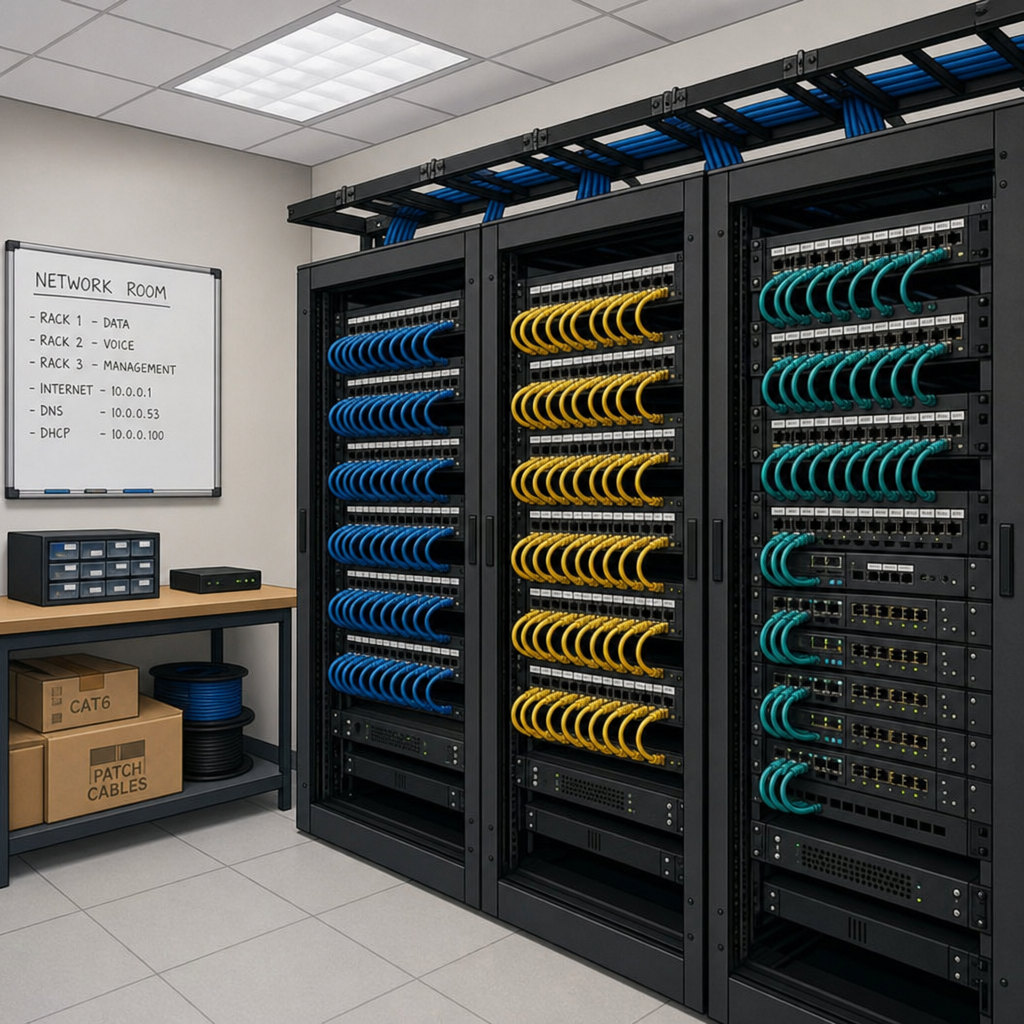
Overlooking the network room. The network room is the heart of the system. Poor rack layout, inadequate power, limited cooling, and messy patching can create ongoing problems. A good structured cabling plan should include the physical environment where network equipment lives.
Not testing the installation. Assuming cables work is not the same as verifying performance. Testing helps catch problems before they affect users.
How Structured Cabling Supports Future Technology
Technology changes quickly, but the need for reliable connectivity remains constant. Structured cabling helps businesses prepare for future demands by creating a flexible infrastructure. Future needs may include faster internet service, more cloud-based applications, higher-resolution video conferencing, expanded Wi-Fi coverage, more connected security devices, smart building systems, additional employees or locations, and increased data transfer between systems.
A thoughtful cabling design can make upgrades easier. Instead of replacing the entire physical network every time technology changes, businesses can often upgrade switches, routers, access points, or endpoints while continuing to use the underlying cabling infrastructure.
Structured Cabling for New Construction vs. Existing Buildings
New Construction
New construction offers the best opportunity to design cabling from the ground up. Pathways, telecom rooms, conduits, and equipment spaces can be planned before walls and ceilings are finished. This can make installation more efficient and help avoid expensive retrofits later. Business owners, contractors, architects, and IT teams should coordinate early so technology infrastructure is not treated as an afterthought.
Existing Buildings
Existing buildings may require more creativity. Technicians may need to work around finished walls, limited pathways, older cabling, shared spaces, or building restrictions. A structured cabling upgrade in an existing facility may include removing abandoned cable where appropriate, improving the network room, adding new drops, upgrading backbone connections, or replacing outdated wiring. For occupied offices, scheduling is also important, as work may need to be phased to reduce disruption.
What to Look for in Network Cabling Solutions
When comparing network infrastructure solutions, businesses should look for more than cable installation. A strong provider should understand network infrastructure, commercial environments, documentation, testing, and future scalability. Important qualities include:
- Experience with commercial low-voltage cabling
- Knowledge of structured cabling systems
- Ability to design for current and future needs
- Clear communication before and during the project
- Professional cable management and labeling
- Testing and documentation after installation
- Familiarity with copper and fiber optic cabling
- Respect for building requirements and worksite safety
- Coordination with IT teams, contractors, or property managers
The right partner should help translate business needs into a practical cabling design and explain tradeoffs clearly, such as when copper is sufficient, when fiber makes sense, and how much extra capacity to plan for.
Is Structured Cabling Worth It for Small Businesses?
Yes, structured cabling can be valuable even for small businesses. A small office may not need a complex network design, but it still benefits from organized, reliable, and documented cabling. For example, a small accounting firm may need wired connections for desktops, VoIP phones, printers, secure Wi-Fi access points, and conference room equipment. A dental office may need network connections for front desk systems, treatment rooms, imaging devices, phones, and patient Wi-Fi. A boutique retail store may need point-of-sale terminals, cameras, inventory systems, and guest internet.
In each case, structured cabling helps the business avoid messy wiring and makes future changes easier. The system does not have to be oversized. It simply needs to be planned.
Structured Cabling and Business Continuity
Business continuity is not only about backup software or disaster recovery plans. Physical infrastructure matters too. If cabling is unreliable, poorly documented, or hard to repair, a simple network issue can become a major disruption. Structured cabling supports continuity by making the network easier to understand and maintain. When cables are labeled, pathways are organized, and documentation is available, IT teams can respond more quickly when changes or repairs are needed.
This is especially important for organizations where downtime affects revenue, safety, patient care, customer service, or daily operations.
The Bottom Line
Structured cabling is the organized physical foundation of a modern network. It connects people, devices, applications, and building systems through a planned infrastructure of copper cabling, fiber optic cabling, patch panels, racks, outlets, and pathways.
The value of structured cabling is not just cleaner wiring. It improves reliability, simplifies troubleshooting, supports growth, strengthens Wi-Fi performance, and helps businesses prepare for future technology. Whether you are building a new office, expanding a facility, upgrading an outdated network closet, or planning a full network infrastructure overhaul, structured cabling gives your organization a stronger foundation for daily operations and long-term growth.
EITS provides structured cabling and data center installation services for businesses in Irving, Texas and the DFW area. Contact us to discuss your cabling project.