
Fiber Optic Patch Cable Colors: What Do They Mean?
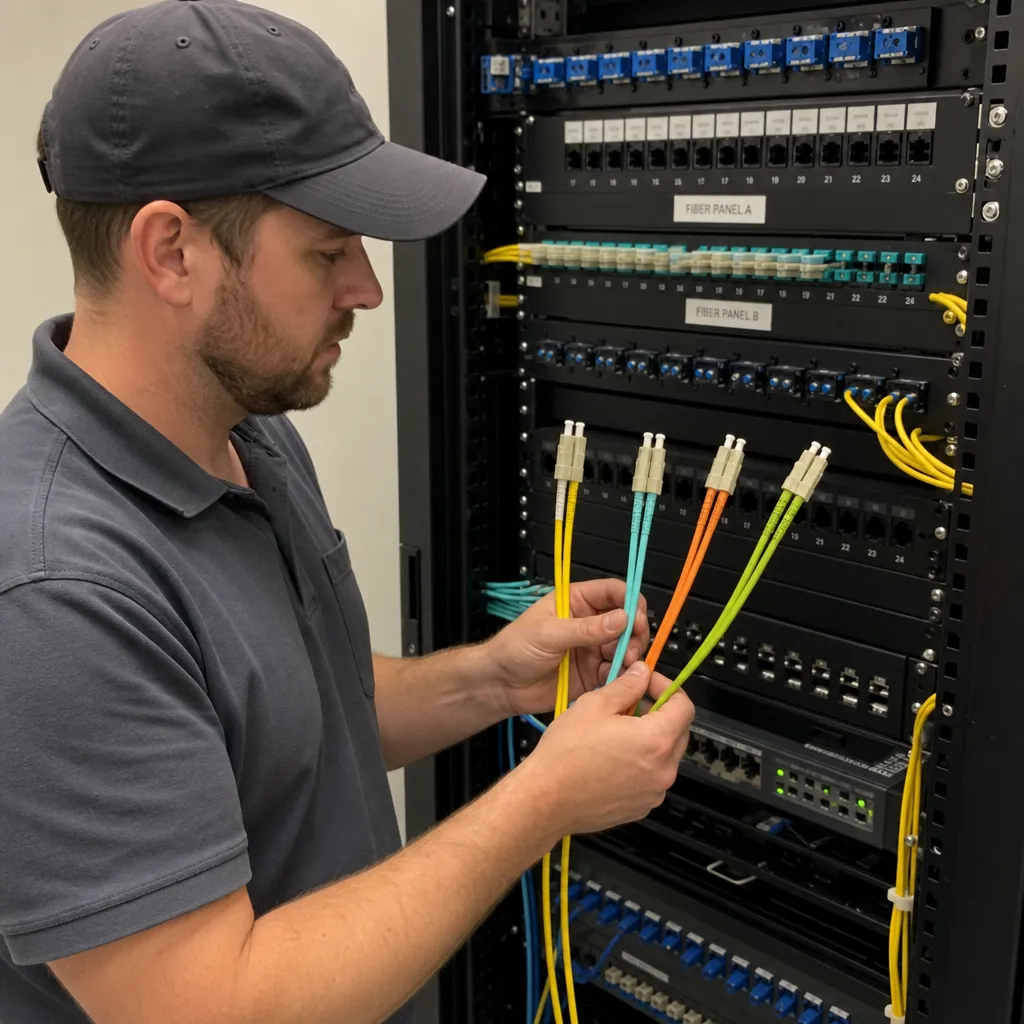
If you have ever stood in front of a fiber patch panel and wondered why some patch cords are yellow, some are aqua, some are orange, and some connectors are blue or green, you are not alone. Fiber optic patch cable colors are meant to make identification faster, safer, and more consistent. In a dense rack, a few seconds of visual recognition can prevent the wrong patch, the wrong transceiver, or a costly troubleshooting session.
At the simplest level, fiber optic patch cable colors usually indicate the fiber type, performance category, or connector polish. The jacket color often tells you whether the cable is single-mode or multimode. Connector body, boot, and adapter colors can add another layer of meaning, such as whether a single-mode connector is UPC or APC. Inside multi-fiber cables, individual strands also follow a repeatable color sequence for splicing and documentation.
However, color should be treated as a guide, not the only source of truth. Standards such as TIA-598 influence common cable color coding, but manufacturers, legacy installations, military applications, outdoor cable designs, and custom plant standards can create exceptions. The safest practice is to use color for quick identification, then confirm with the cable print legend, connector markings, drawings, and test results where needed.
Why fiber optic colors matter
Fiber links are unforgiving when the wrong components are mixed. A copper Ethernet patch cord may simply negotiate a slower speed or fail link, but a fiber connection depends on matching the correct optical transceiver, fiber core size, wavelength, connector polish, polarity, and loss budget. Color coding helps technicians quickly distinguish among common fiber optic types before making or changing a connection.
In day-to-day network work, fiber optic colors help with:
- Speed and accuracy: Identifying single-mode, multimode, OM3, OM4, OM5, or legacy fiber at a glance.
- Safety: Avoiding accidental disturbance of active links in high-density cabinets.
- Compatibility: Reducing the chance of plugging a multimode patch cord into a single-mode pathway, or matching APC and UPC connectors incorrectly.
- Documentation: Supporting cable schedules, port maps, splice records, and rack elevation drawings.
- Troubleshooting: Narrowing down whether a link issue may involve the wrong fiber grade, wrong patch cord, or incorrect connector type.
- Maintenance consistency: Helping multiple teams follow the same visual language across patch panels, cabinets, data halls, and telecom rooms.
Color becomes especially useful in dense environments where many patch cords look physically similar. LC duplex patch cords, for example, can appear nearly identical except for the jacket and connector color. Without a color system, a technician may need to inspect tiny print on every cable before touching anything.
The three places color appears on a fiber patch cable
When people talk about fiber optic patch cable colors, they often mean the outer jacket. But in practice, several parts of a fiber assembly may be color coded.
1. Jacket color
The jacket is the outside sheath of the patch cable. It is the most visible part of the cable and is commonly used to identify the fiber category. For example, a yellow jacket usually signals single-mode fiber, while aqua often signals laser-optimized multimode fiber such as OM3 or OM4.
2. Connector, boot, and adapter color
The connector housing, strain relief boot, clip, or mating adapter may also be colored. These colors can indicate fiber type, connector polish, or both. Blue connectors are commonly associated with single-mode UPC/PC connectors, while green connectors typically identify APC.
3. Internal fiber strand color
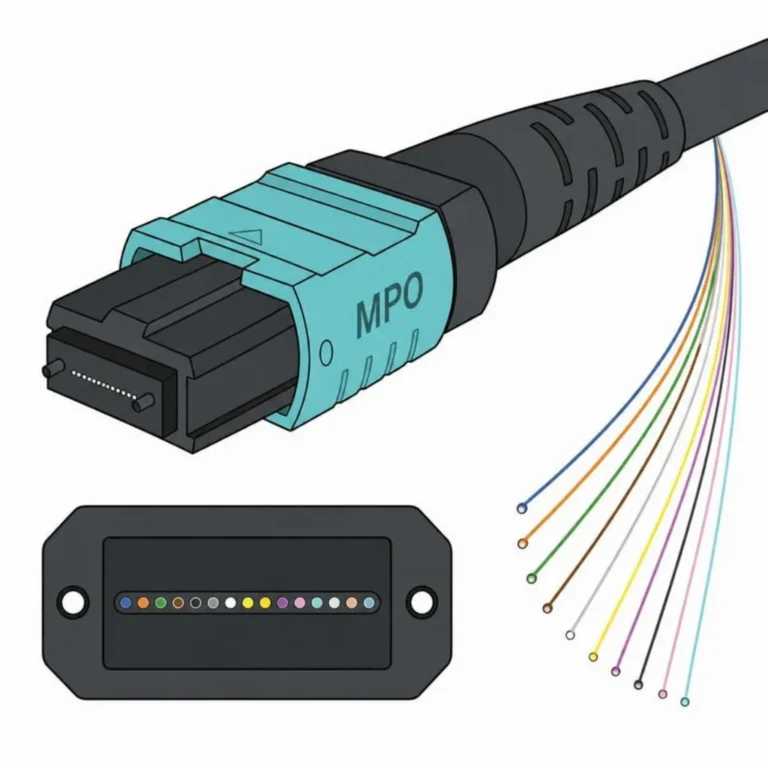
Inside multi-fiber cables, the coated fibers or buffered fibers are color coded so technicians can identify fiber numbers during splicing, termination, and testing. The common 12-color sequence is blue, orange, green, brown, slate, white, red, black, yellow, violet, rose, and aqua.
These three color systems overlap, but they do not always mean the same thing. A yellow outer jacket may indicate single-mode cable, while a blue connector on that same patch cord may indicate a regular single-mode UPC-style connector. A green connector on a yellow cable usually points to single-mode APC. A multi-fiber cable may have a black jacket outdoors, but still contain color-coded internal fibers.
Common fiber optic patch cable jacket colors
The most familiar patch cord colors in commercial networks are yellow, orange, aqua, violet, and lime. These are commonly used in premises cabling and patch cords to identify the optical fiber category.
Yellow: single-mode fiber, commonly OS1 or OS2
Yellow is the most recognized jacket color for single-mode fiber. Single-mode fiber has a much smaller core than multimode fiber and is designed for long-distance, laser-based transmission. It is widely used for campus backbones, telecommunications circuits, carrier handoffs, internet service provider links, passive optical networks, and data center interconnects.
In many enterprise and data center environments, a yellow patch cord typically means OS2 single-mode fiber. OS1 may still appear in some indoor legacy environments, but OS2 is the standard for modern single-mode installations.
Yellow is not enough information by itself. You still need to know the connector type and polish. A yellow cable with blue LC connectors is not the same as a yellow cable with green LC connectors. Blue typically indicates a non-angled single-mode physical-contact style, while green indicates APC.
Orange: legacy multimode fiber, commonly OM1 or OM2
Orange is commonly associated with multimode fiber, especially older multimode installations. In many U.S. premises networks, orange patch cords indicate OM1 62.5/125 µm or OM2 50/125 µm multimode fiber. TIA-598 lists orange for non-military OM1 and OM2 jacket identification, with the print legend used to distinguish the actual classification.
This is one reason orange patch cords should be handled carefully in upgrades. OM1 and OM2 are both multimode, but they are not the same performance category. OM1 uses a 62.5 µm core, while OM2 uses a 50 µm core. If an orange patch cord is not clearly marked, verify the cable print or documentation before assuming it will support a given link speed and distance.
Orange is often a sign that you are dealing with a legacy pathway. That does not mean the cable is unusable, but it does mean the link budget and application support should be checked before upgrading electronics.
Aqua: laser-optimized multimode, commonly OM3 or OM4
Aqua is the standard visual cue for laser-optimized 50/125 µm multimode fiber. In most modern enterprise networks, aqua patch cords are associated with OM3 or OM4. These fibers are designed for short-reach, high-speed applications using 850 nm optics, such as many data center and LAN links.
Aqua can create confusion because it commonly covers both OM3 and OM4. TIA and ISO did not introduce a new standard color for OM4, although some manufacturers adopted violet to help distinguish OM4. Because OM3 and OM4 may look the same, never rely on aqua alone when performance matters. The print legend should identify OM3 or OM4. In a data center, that difference may affect supported distance for higher-speed applications.
Violet or Erika violet: often used for OM4 in some systems
Violet is commonly seen as a manufacturer or regional convention for OM4 multimode fiber. It is helpful because it visually separates OM4 from OM3, even though aqua is also widely used for OM4. If your site uses violet patch cords, document that convention clearly so visiting technicians, contractors, and remote-hands teams do not mistake it for a custom color with a different meaning.
The key point is that violet usually indicates OM4 only when the manufacturer or site standard says it does. It is not a universal substitute for reading the jacket legend.
Lime green: OM5 wideband multimode fiber
Lime green is associated with OM5 wideband multimode fiber. OM5 is designed for short wavelength division multiplexing across multiple wavelengths in the 850 nm region. TIA’s OM5 color-coding addendum defines the jacket color for wideband laser-optimized 50/125 µm multimode fiber, with the goal of visually identifying multimode cable specified to support wavelength division multiplexing from near 850 nm to 953 nm.
In current installations, lime patch cords are less common than aqua or yellow. If you encounter lime, confirm that the rest of the channel, including trunks, cassettes, patch cords, and optics, was designed for OM5 use. OM5 is not simply newer aqua; it is a specific multimode category with a specific application profile.
Black: outdoor, armored, hybrid, or custom-use cable
Black is common for outside plant cable because the jacket material often needs UV resistance. Outdoor cables may be black even when the fibers inside are single-mode or multimode. In patching environments, black can also be used for custom purposes, specialty assemblies, or manufacturer-specific product lines. Because black does not have one universal meaning in all patch cord contexts, the print legend and labeling matter.
Blue: sometimes polarization-maintaining or custom use
Blue can be confusing because it may appear on jackets, connectors, and adapters. As a jacket color, blue may be used for polarization-maintaining single-mode fiber in some color-coding references, but it is also used by organizations as a custom patch cord color. As a connector color, blue more commonly indicates a single-mode PC/UPC-style connector. If you see a blue fiber patch cord, do not assume it means the same thing as a blue connector. Check the cable markings, the part number, and the site standard.
Quick reference: common patch cord jacket colors
| Jacket Color | Fiber Type | Common Use |
|---|---|---|
| Yellow | Single-mode OS1/OS2 | Long-distance, campus backbone, DCI |
| Orange | Multimode OM1/OM2 | Legacy installations |
| Aqua | Multimode OM3/OM4 | Short-reach data center, LAN |
| Violet | Multimode OM4 (some vendors) | OM4 where violet convention is used |
| Lime green | Multimode OM5 | Wideband multimode, SWDM |
| Black | Any (outdoor/armored) | Outside plant, UV-resistant, custom |
| Blue | Polarization-maintaining or custom | Specialty or site-specific |
The best rule is simple: use color as the first clue, not the final answer.
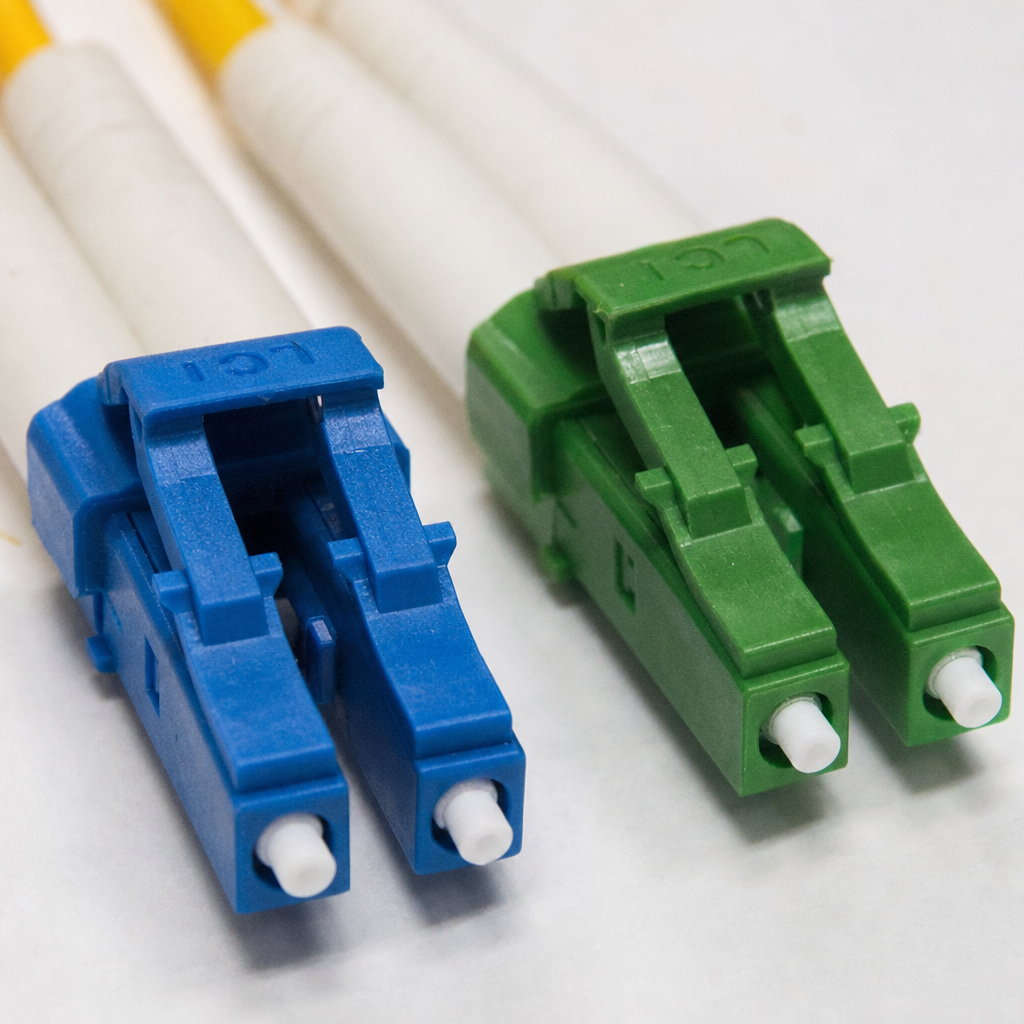
Connector colors: why blue and green matter
The outer jacket tells you about the cable, but the connector color may tell you about the end face. This matters because connector polish affects return loss, reflectance, compatibility, and physical mating.
Blue connectors
Blue connector bodies or boots are commonly associated with single-mode PC or UPC-style connectors. In many enterprise racks, a yellow patch cord with blue LC connectors is a single-mode UPC patch cord.
Green connectors
Green connector bodies or boots typically identify APC connectors. APC stands for angled physical contact. The connector end face is polished at an angle, commonly used to reduce back reflection in single-mode systems. GPON, RF video, some carrier handoffs, and certain high-reflectance-sensitive systems often use APC.
Beige, black, aqua, and lime connectors
Multimode connector and adapter colors may also follow fiber type conventions: beige for 62.5/125 OM1, black for 50/125 OM2, aqua for laser-optimized OM3/OM4, and lime for OM5.
Do not mate APC and UPC connectors
A green APC connector should not be mated to a blue UPC connector. The angled and non-angled end faces do not align properly. At best, the connection may show excessive loss and reflection. At worst, repeated mating can damage the connector surfaces. This is one of the most important practical lessons in cable color coding: a yellow jacket only tells you the fiber is likely single-mode. The connector color tells you whether you are dealing with APC or UPC. Always match polish types and use the correct adapter.
Internal fiber color coding: the 12-color sequence
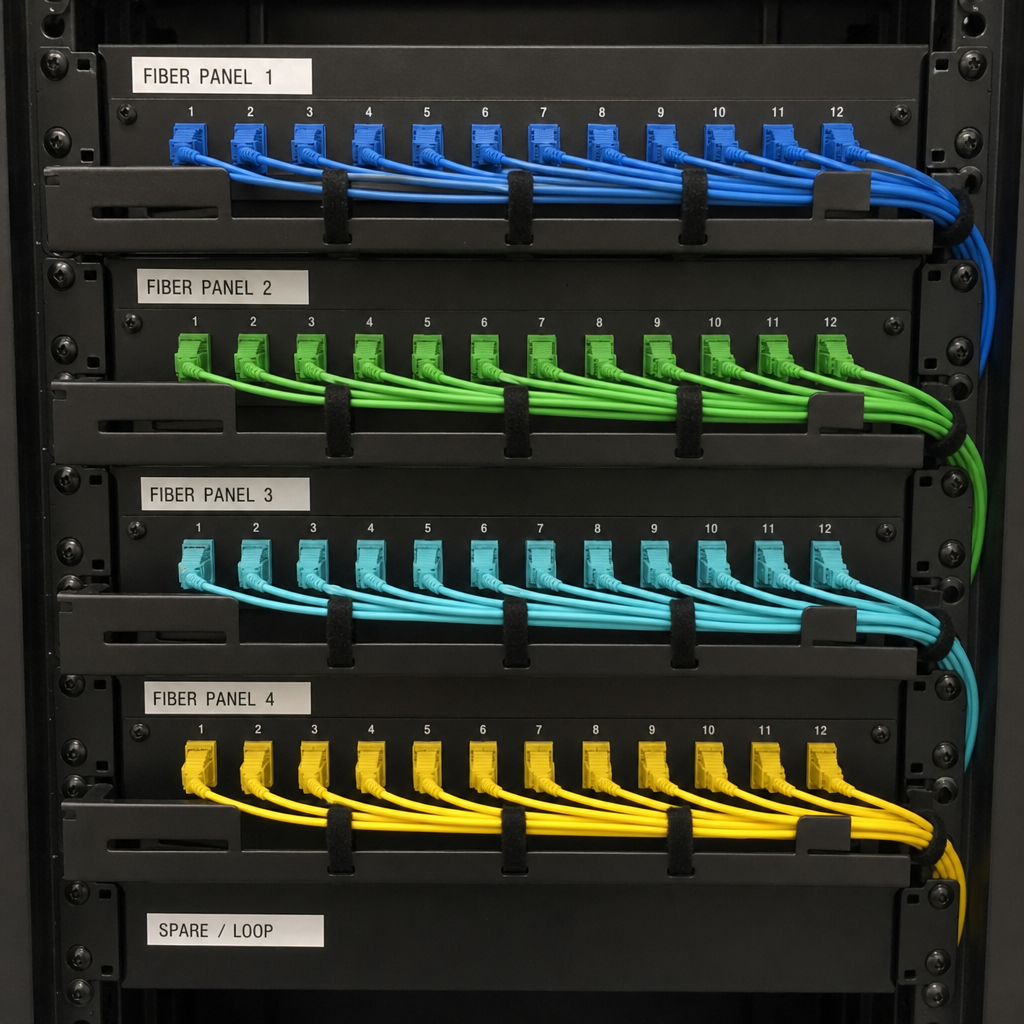
Patch cords are usually simple enough to identify by jacket and connector colors. But trunk cables, breakout cables, ribbon cables, and loose-tube cables use internal fiber colors to identify individual strands. The common TIA-598 12-color sequence is:
- Blue
- Orange
- Green
- Brown
- Slate
- White
- Red
- Black
- Yellow
- Violet
- Rose
- Aqua
After 12 fibers, the sequence repeats in structured ways depending on the cable design. Buffer tubes may follow the same color sequence, then repeat with stripes for additional groups.
This internal color system is essential for splicing the correct fiber to the correct destination, maintaining polarity across multi-fiber trunks, testing individual fibers in a high-count cable, and mapping fibers to ports, cassettes, and patch panels.
Internal strand colors are not the same thing as patch cord jacket colors. For example, a yellow internal fiber may simply be fiber number nine in a tube, not single-mode fiber. Context matters.
How color coding differs by fiber type
Understanding fiber optic types makes the colors easier to remember. Most patch cord colors are connected to whether the fiber is multimode or single-mode, and then to its performance category. For a deeper look at the differences, see our guide on single mode vs multimode fiber.
Single-mode fiber
Single-mode fiber has a small core and supports one primary mode of light. It is used for longer distances and is common in telecom, carrier, campus, and data center interconnect applications. Yellow is the typical premises patch cord jacket color for single-mode OS1/OS2. Single-mode connector colors add another important layer:
- Blue connector or boot: Usually PC/UPC single-mode.
- Green connector or boot: Usually APC single-mode.
The connector color is particularly important because the wrong polish can cause serious optical performance problems.
Multimode fiber
Multimode fiber has a larger core and supports multiple light paths. It is typically used for shorter-distance links inside buildings and data centers. Multimode patch cord colors vary by generation and performance class:
- OM1: Often orange, 62.5/125 µm.
- OM2: Often orange, 50/125 µm.
- OM3: Usually aqua, laser-optimized 50/125 µm.
- OM4: Usually aqua or violet, laser-optimized 50/125 µm.
- OM5: Lime green, wideband 50/125 µm.
When OM3 and OM4 are both aqua, read the cable print. If you are upgrading to a higher data rate, that difference can determine whether the installed channel supports the required distance.
Why the cable print legend is more reliable than color alone
Color is fast, but the cable print legend is more specific. A jacket legend may include fiber category, core size, fiber count, flame rating, manufacturer, part number, and sometimes performance details. You should check the print legend when the cable color does not match the expected site standard, when you are working with legacy orange multimode cable, when you need to distinguish OM3 from OM4, when the patch cord is an unusual color, or when you are documenting a circuit for compliance, audit, or handoff.
Common mistakes with fiber optic patch cable colors
Assuming aqua always means OM4: Aqua may be OM3 or OM4. In many networks, both look nearly identical from a distance. Always verify the cable print before assuming supported speed or distance.
Assuming orange multimode is all the same: Orange can indicate OM1 or OM2, and older multimode cables may not be clearly marked. That difference matters because OM1 and OM2 have different core sizes and performance characteristics.
Ignoring connector polish: A yellow cable can have blue or green connectors. Blue and green are not cosmetic choices. They usually indicate different connector polish types. Never connect APC to UPC just because both patch cords are single-mode.
Treating black cable as single-mode: Outdoor single-mode cables are often black, but black does not automatically mean single-mode. Outdoor multimode, hybrid, armored, and specialty cables may also be black. Read the print legend.
Forgetting about custom site standards: Some organizations use custom patch cord colors to identify network zones, security levels, or service types. Document local rules clearly so visiting technicians do not misread the color system.
Mixing manufacturer conventions: One manufacturer may offer violet OM4 assemblies, while another may supply aqua OM4. A site that buys from multiple vendors can end up with both colors representing the same fiber category. Standardize procurement if visual consistency matters.
Best practices for using cable color coding
Create a written site color standard. Document what each color means in your environment, including jacket colors, connector colors, adapter colors, labels, and exceptions. Keep the standard accessible to network engineers, data center technicians, contractors, and remote-hands teams.
Label both ends of every patch cord. Color does not replace labeling. Every production circuit should have clear identification at both ends, including circuit ID, source cabinet and port, and destination cabinet and port.
Keep APC and UPC physically separated. Use green adapters only where APC is required. Avoid storing blue and green single-mode patch cords together in unlabeled bins.
Standardize purchases. Specify fiber type, jacket color, connector color, connector polish, cable diameter, flame rating, and length when ordering patch cords. Procurement can undermine a color strategy if substitutions are allowed without review.
Do not use color as proof of performance. Color identifies category, not condition. A correctly colored patch cord can still be dirty, damaged, kinked, or mislabeled. Optical testing and inspection are still necessary for critical circuits.
How to identify an unknown fiber patch cable
- Look at the jacket color. Note whether it is yellow, orange, aqua, violet, lime, black, or another color.
- Read the jacket print. Look for OS2, OS1, OM1, OM2, OM3, OM4, OM5, 50/125, 62.5/125, or similar markings.
- Check the connector color. Blue usually suggests single-mode UPC/PC, green suggests APC, and aqua/beige/black/lime may indicate multimode categories.
- Confirm connector form factor. Identify LC, SC, ST, FC, MPO/MTP, or another connector type.
- Check simplex, duplex, or multi-fiber construction. Duplex LC patch cords behave differently from MPO trunks and breakout assemblies.
- Compare with site documentation. Make sure the color aligns with local standards and drawings.
- Inspect and clean. Connector contamination is a major cause of link problems, regardless of color.
- Test when necessary. Use appropriate light source, power meter, visual fault locator, OTDR, or certification equipment depending on the situation.
Fiber patch cable color and transceiver compatibility
Patch cord color also helps match cables to optical transceivers. Many short-reach multimode transceivers are designed for OM3 or OM4 fiber, while long-reach and telecom optics typically use single-mode fiber. Using the wrong fiber type can prevent the link from coming up or produce unreliable performance.
- An 850 nm multimode transceiver usually expects multimode fiber such as OM3 or OM4, often seen as aqua or violet patch cords.
- A 1310 nm or 1550 nm single-mode transceiver usually expects OS2 single-mode fiber, often seen as yellow patch cords.
- A PON or carrier handoff may require single-mode APC connectors, typically a yellow cable with green connectors.
- MPO-based multimode links need correct fiber type and correct polarity method, not just the right jacket color.
Color helps you quickly spot a mismatch, but the transceiver datasheet and cabling design should determine the correct patch cord.
Summary
Fiber optic patch cable colors are a practical visual language. Yellow usually points to single-mode. Orange usually points to legacy multimode. Aqua usually points to OM3 or OM4. Violet often points to OM4 where that convention is used. Lime green points to OM5. Blue and green connector colors often distinguish single-mode UPC from APC.
The most important rule is this: color is a shortcut, not a certification. Use jacket color, connector color, labels, print legends, documentation, inspection, and testing together. When your team treats fiber optic colors as part of a complete identification system, your fiber plant becomes easier to maintain, safer to change, and less likely to suffer avoidable downtime.
Need fiber patch cables for your installation? EITS supplies OS2, OM3, and OM4 patch cables, MPO trunk cables, and MPO breakout cables from Irving, Texas. Contact us for a quote.